IT Building
IT Building: the IT of the building itself
Every commercial building has a digital foundation: the fibre, the technical room, the cables to every floor and the network of the building systems. That is IT Building. It is the layer every tenant builds on.
What is IT Building?
IT Building is the IT infrastructure that belongs to the building itself, and that stays when a tenant leaves. Think of the fibre connection, the technical room, the cabling to every floor, the basis for WiFi and mobile coverage, and the network of the building systems. The owner is usually responsible for it. The IT-Label calls this the building-related IT infrastructure.
You usually do not see IT Building. It is in walls, ceilings and basements. Yet it decides whether a tenant can start work on day one, whether the WiFi works across the whole floor and whether the building is ready for smart systems and AI.
What belongs to IT Building?
From the meter cupboard to the roof. These are the parts that belong to the building, and that stay when a tenant leaves.
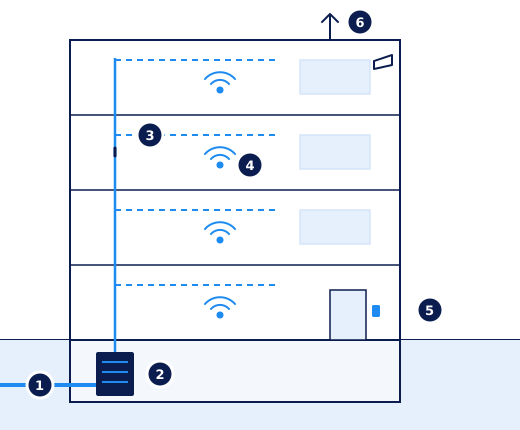
- Incoming fibreThe connection from the street into the building. Preferably with a second route.
- The technical roomWhere the network equipment is: cool, dry and locked.
- Cabling to every floorA fixed, documented layout of cables up to the connection points.
- The basis for WiFiCables and power to the places where access points will go.
- The network of the building systemsClimate, access, cameras and meters, in their own protected network.
- Mobile coverage and a backup connectionGood calls on every floor, and staying online when the main connection fails.
Two layers: the building and the space
The IT-Label always distinguishes between two layers. The first layer is IT Building. The second layer is the IT fit-out of the space.

| Layer | What belongs to it | Usually |
|---|---|---|
| The building | Fibre, technical room, cabling, core network, mobile coverage, network of the building systems | The owner |
| The space | Own network equipment, workstations, printers and meeting room equipment | The tenant |
The dividing line between the two layers differs per building and per contract. In a building delivered ready to use, the owner often arranges the WiFi too. In a shell building, the tenant arranges almost everything. So always record who does, pays for and manages what. That is what the IT Demarcation List is for.
IT Building and Smart Building
The two are often mixed up, but they are not the same. IT Building is the foundation: the ducts, the cables and the network. A Smart Building is what runs on it: systems that control climate, lighting, access and occupancy smartly.
A smart building is only as good as the network underneath. A sensor without a connection, or a climate system on the same network as the guests, mainly causes problems. So start with IT Building. More about Smart Building
The smart installations themselves are also known as OT: operational technology. What the difference with IT is, and why you keep them separate, is explained in IT and OT: the difference, and why it matters in buildings.
Why IT Building matters more and more
- Tenants want to start straight away. They work in the cloud, call by video and use AI. A building where the IT first needs months of work drops off the list. Read Renting an AI-proof office.
- Buyers and investors look at it. Outdated cabling or a poor technical room are investments that come on top. Read Technical due diligence in real estate.
- The law asks for it. Since 1 January 2026, large non-residential buildings in the Netherlands must have a building automation system, and that runs on the network. And tenants that fall under the Dutch Cybersecurity Act set requirements for the building's network. Read IT and regulation.
- The building has to keep up. More devices, faster WiFi and more data traffic. What you install now must still work in ten years. Read CAT6 or CAT6A.
How to make IT Building measurable
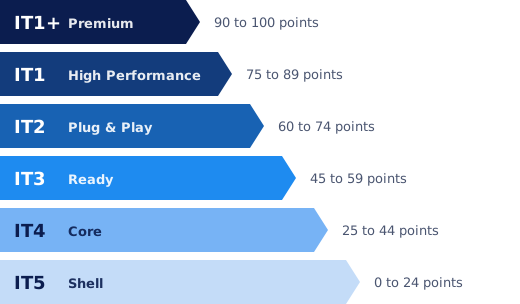
IT in a building is often discussed in vague terms. "Fibre available" says little. The IT-Label makes the digital quality of a building measurable and comparable, with one level from IT1+ Premium to IT5 Shell. Just as the energy label does for energy.
Start with the free self-scan. If you want to be sure, we carry out a pre-inspection. An IT-Label audit gives you an official label.
Questions about IT Building
What is IT Building?
IT Building is the IT that belongs to the building itself: the fibre connection, the technical room, the cabling, the basis for WiFi and mobile coverage, and the network of the building systems. It is the digital foundation every tenant builds on.
What is the difference between IT Building and Smart Building?
IT Building is the foundation: the ducts, the cables and the network. A Smart Building is what runs on it: smart systems for climate, lighting, access and occupancy. Without good IT Building, a smart building does not work well.
Who pays for the IT of a building?
Usually the owner pays for the IT that belongs to the building, and the tenant for the IT fit-out of their own space. The dividing line differs per building and per contract. So record it in the IT Demarcation List.
Does WiFi belong to the building or to the tenant?
That differs. In a building delivered ready to use, the owner often arranges the WiFi. In other buildings the owner only provides the cabling and the tenant installs their own access points. Agree on it in advance.
How do I know how good the IT Building of my property is?
Start with the free self-scan. If you want to be sure, we carry out a pre-inspection. An IT-Label audit gives you an official level, from IT1+ to IT5.
Further reading
How strong is the IT Building of your property?
A pre-inspection maps the digital foundation of your building, from the meter cupboard to the roof.