The six levels of the IT-Label
From everything arranged to an empty shell. The label does not say whether a building is good or bad. It says what is in place.
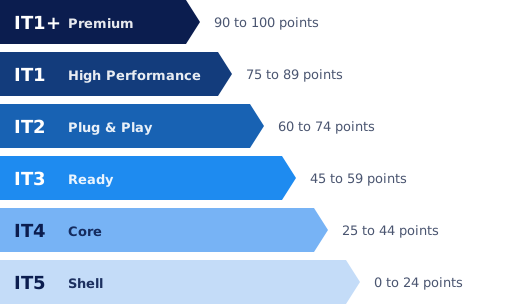
Levels and point ranges according to it-label.com.
Which level suits you?
A higher level is not always better. What matters is that the level suits what the user needs. This rule of thumb helps you get started. It is based on our experience, not an official classification.
- IT1+ and IT1: organisations that run entirely on IT, with many video calls and work in the cloud or with AI. Also for business centres, where the connection is the product. Also read renting an AI-proof office.
- IT2: most office organisations that want to get started straight away. Fibre, cabling and WiFi are in place, and they work.
- IT3: tenants with their own IT department or IT partner, who build on a good foundation themselves.
- IT4 and IT5: tenants who want to fit out everything to their own requirements, or a building that is being refurbished. The label then makes clear which investment is still needed, and by whom. See the IT Demarcation List.
How is the level determined?
The level follows from an IT-Label audit by a certified partner, using one fixed method. We look on site at what is in place and measure how it performs, where people work. The certificate is valid for two years.
The audit assesses six components. Together they determine the level.
- Connectivity: Type of connection, capacity, redundancy, speed, latency and stability.
- Infrastructure: Cabling, WiFi, patch and server rooms, network management and backup connections.
- Performance: The measured performance under actual load, not the specification on paper.
- Scalability: Whether the infrastructure scales with increasing load and new applications.
- Integration: Whether building systems work together or stand apart.
- Smart Building: Climate control, access control, camera security, visitor registration and reservation systems.
Moving up a level: how?
The gains are often in a few targeted steps. A pre-inspection tells you exactly which ones, and roughly what they cost.
- Renew the cabling. Replace old CAT5e with CAT6A, so modern WiFi can reach its full speed.
- Measure and extend the WiFi. A WiFi survey shows where coverage or capacity falls short.
- A second connection. With redundancy, one broken cable no longer takes down the whole building.
- Separate the networks. Building systems and tenants on their own separate networks. See network segmentation.
- Monitoring. With network monitoring you see problems before users notice them.
Questions
Do you have a label? Read how to use it in your brochure.
Is a higher level always better?
No. The level shows what is in place, not whether a building is good or bad. A tenant who wants to fit out everything themselves may actually be happy with IT4 or IT5. What matters is that the level suits what the user needs.
How long is the level valid?
The certificate is valid for two years. After that comes recertification. If you have invested in the meantime, you can also have the building reassessed sooner.
Can I estimate the level of my building myself?
Yes, the free self-scan gives you an indication in two minutes. The official level only follows from an on-site IT-Label audit.
What is the difference from the energy label?
The energy label is about energy, the IT-Label about digital infrastructure. They work in a similar way, with a scale everyone understands. Read IT-Label and energy label: the difference.
Where does your building stand?
The self-scan shows you in two minutes which level your building is likely to reach.