"How fast does our internet actually need to be?" We hear this question a lot, from tenants who are about to move and from owners who want to improve a building. The honest answer: it depends on what your team does. But you can work it out quite well. This article shows you how.
Start with what people do
The speed you need follows from the work. In an average office, the internet is mainly used for:
- Video calls. Teams, Zoom or Google Meet. This is usually the biggest user, and also the most sensitive one.
- Working in the cloud. Opening and saving files in SharePoint, OneDrive or Google Drive.
- AI tools. Uploading documents, summarising meetings, analysing data.
- Updates and backups. Laptops, phones and servers updating in the background.
- Internet calling. Many companies no longer call over a fixed line.
- The building itself. Cameras, access control and other building systems use the connection too.
What does a video call use?
Microsoft gives clear figures for Teams. For a meeting with video up to 1080p (Full HD), Microsoft recommends 2.5 Mbit/s up and 4 Mbit/s down per participant. For the best quality, for example in large meetings, it is 4 Mbit/s in both directions. Teams can work with much less, but then the picture gets smaller and less smooth.
Zoom is in the same range: for 1080p in a group call, 3.8 Mbit/s up and 3.0 Mbit/s down.
A useful rule of thumb is therefore: allow about 4 Mbit/s per person on a video call, in both directions.
A worked example
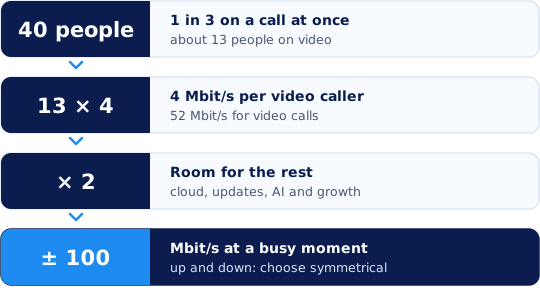
Say your office has 40 employees. Not everyone is on a call at the same time. At a busy moment, for example on Tuesday morning, perhaps a third of the people are in a video call. That is about 13.
- Video calls: 13 people times 4 Mbit/s is 52 Mbit/s, up and down.
- Everything else: the cloud, updates, AI and the building. Take at least double for this.
- Result: at a busy moment you need about 100 Mbit/s, in both directions.
That is a minimum, not advice for your subscription. A connection that is 90 percent full at the busiest moment feels slow. So keep a wide margin. For this office, a business fibre connection of 500 Mbit/s or 1 Gbit/s leaves room for peaks and growth.
Use your own numbers. Does your team mostly work at client sites? Then the share is lower. A call centre, or a team that is on calls all day? Then it is higher.
Do not forget the upload
On a video call you send your own picture. When you work in the cloud and with AI, you send files. So upload matters as much as download.
On many connections the upload is much lower than the download. A "1000 Mbit/s" subscription may then only reach 50 or 100 Mbit/s up. So preferably choose a symmetrical connection: as fast up as down. With fibre this is usually possible.
Speed is not everything
A fast connection does not help if the rest of the building cannot keep up. Also look at:
- Response time. For video calls, a low and stable latency matters more than a high speed. Read Testing your internet speed: how to measure it fairly.
- The WiFi. Most people work wirelessly. Read Office WiFi: why "we have WiFi" is not enough.
- The cabling. Old cables slow down everything behind them. Read CAT6 or CAT6A: which network cable for your office?
Also think about a second connection
The more your team depends on the internet, the bigger the damage when it fails. A 4G or 5G backup connection usually has less capacity than the fixed line. So decide in advance what must keep working during an outage. Read more in Preventing internet outages at the office.
How do you know what you use now?
- Look in your router or firewall. It often shows how much traffic there is at busy moments.
- Ask your provider for an overview of your usage.
- Take the free speed test in a few places and at a few times.
Want to be sure your connection and contract fit your team? With connectivity advice we put your usage, your connection and your contracts side by side. And with a pre-inspection we look at the whole digital infrastructure of the building.
Sources
- Microsoft Learn: Prepare your organization's network for Teams, bandwidth requirements per participant (updated 2026).
- Zoom Support: bandwidth requirements for Zoom Meetings.